Watch your pace, not your spreadsheets.
Track daily booking pace and occupancy against your monthly revenue budgets, without spinning up another tool. Pickup report sits inside TwikPMS, fed by the same bookings you're already managing.
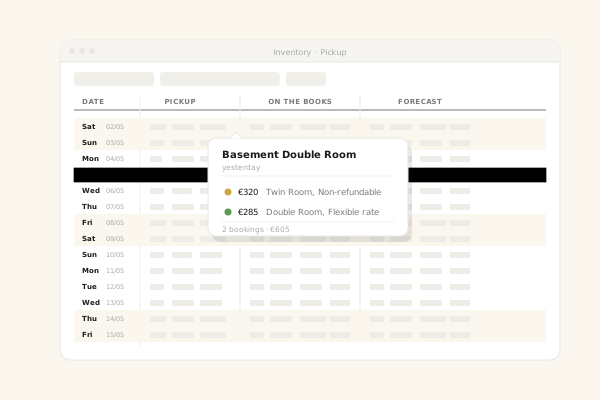
The numbers your revenue team checks every morning.
Pickup report rolls up bookings made yesterday, this week, and this month, split by additions and cancellations, so you always know if pace is on track.
See every addition and cancellation, the moment it lands.
Each day's pickup is broken down by room type, rate plan, and channel, and any row expands to the bookings behind it.
- Net pickup, gross adds, and cancellations broken out
- Room-type breakdown of pickup and occupancy
Pace, occupancy, and revenue against the budget you set.
Set monthly revenue and occupancy budgets once. Pickup report compares them daily to actuals and forecast, so you know whether to push rates, open up restrictions, or lean on the channel manager.
- Set daily budgets for high-level pace guidance
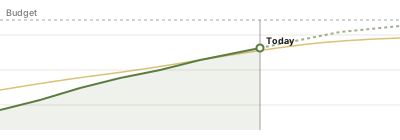
Budgets that live where the bookings live.
Skip the shared spreadsheet. Plan revenue and occupancy per month, right inside TwikPMS. Duplicate last year's plan as a starting point, then adjust it per month.
- Per room-type monthly budgets
| Month | Revenue | Occ |
|---|---|---|
| Mar | € 118.000 | 72% |
| Apr | € 130.000 | 76% |
| May | € 142.000 | 81% |
| Jun | € 156.000 | 85% |
| Jul | € 168.000 | 88% |
| FY total | € 1.640.000 | 79% |
Optional add-ons for revenue managers.
Layer in event awareness and AI rate suggestions when you're ready. They sit in the same dashboard, no second tool to learn.
Anticipate demand spikes.
Overlay events (concerts, conferences, public holidays) on the inventory grid so revenue managers can react before competitors do.
AI rate-move suggestions.
Based on your pickup pace, forward bookings, and event overlay, the assistant suggests rate moves you can apply with one click, or ignore. You stay in charge.
Add pickup report to your TwikPMS plan.
Available as an add-on for any plan. Once it's on for your account, your revenue team can start reading the dashboard right away.